Challenges of Attendance Systems in Medical Schools

An AI-generated image of adult learners in a classroom.

Attendance tracking in medical education serves as a crucial foundation for developing professional responsibility and clinical competence. During the preclinical years, consistent attendance helps students build the comprehensive knowledge base required for patient care. This is achieved through structured learning experiences and real-time interaction with expert faculty. Medical education is collaborative. In case-based learning sessions and problem-based learning, each student’s presence enhances the collective learning environment. Students have valuable peer discussions. They challenge each other’s understanding. They develop the communication skills essential for their future roles as healthcare providers.

The early stages of medical training are particularly critical. They establish patterns of professional behavior and these patterns carry forward into clinical practice. Group learning activities, such as anatomy lab sessions and clinical skills workshops, require full participation to simulate the team-based nature of healthcare delivery. These sessions often cannot be adequately replicated through recorded lectures, independent study, or even as virtual sessions, as they rely on immediate feedback, hands-on practice, and the development of interpersonal skills. Regular attendance also allows faculty to identify struggling students early and provide necessary support, ensuring that future physicians develop the robust foundation of knowledge and skills required for safe and effective patient care.

Attendance tracking is surprisingly challenging in medical education. Many schools don’t use traditional learning management systems like Canvas or Blackboard that have built-in attendance tools. They prefer products that cater to health professions education like Elentra, One45, or MedHub. Medical education differs from other fields. There are 10s to 100s of different faculty members involved in teaching students over their medical careers. In contrast, language arts might only have one instructor for an entire semester. This is mainly due to the standard practice of having experts teach (e.g., a hiatal hernia specialist might teach a lecture on hernias). It can also be common to have 4-6 different faculty members team-teach a case-based lesson as each brings specific knowledge to share with the students. The point is that when there is one main instructor, keeping track of attendance is likely easier.

Some schools utilize technology to automate attendance tracking. At my school (University of Miami Miller School of Medicine), we use technology (iClicker) & rely on paper attendance forms for small group sessions. These sessions are in smaller classrooms and are led by individual facilitators. They pass out the paper forms and students sign their names. After the small group session, they provide the filled out attendance to the program manager who then updates rosters. As I am typing this, I realize how convoluted this sounds! It is convoluted and there are many reasons for it which maybe I’ll go into more detail in another post.

The Solution?

I am the co-chair of the Education Technology Work Group (ETWG). It is part of the American Association of Medical Colleges (AAMC) Group on Information Resources (GIR). This is a very vibrant group of dedicated #EdTech experts in medical schools from across the country. One of the benefits of being co-chair is having the opportunity to influence the topics we discuss. Recently, the topic for our monthly call was attendance tracking. Secretly, I hoped one school would share what they do. I imagined everyone on the call would nod in agreement with happy smiles. They would think that school has The Answer to the problem. Unfortunately, no one had a perfect solution. There is something comforting about experiencing the same issues, even if we don’t have the answers…yet.

At MPOW (my place of work), we use a technological solution for the large group sessions. iClicker is our current solution and interfaces via LTI to our LMS, Blackboard. It’s not perfect. It has a dashboard for students to view their absences. They are limited to a certain number of them each semester so they want to be sure it’s accurate. There is not a way for students to contest absences in the dashboard. iClicker is mainly used for polling though it has attendance tracking functionality. We are looking at Qwickly as a possible replacement and fortunately, it also has an LTI with Blackboard. The same issue plagues Quickly though – there is a dashboard for students to review their attendance / absences, but there is not a way within the program for students to request a review or contest an absence.

So, we’ll do a pilot of it and see if it works any differently than iClicker and if not, there’s no reason to switch programs.

There’s a lot more to be said about the inclusion of technology in general in medical education, requiring attendance at all, and the blending of the two.

Further Reading

Amjad Ali Khan, U. M. (2024). Correlation of Academic Performance with Student Attendance in Pre-Clinical and Clinical Years of Undergraduate Medical Education. J. Islamic Int. Med. Coll.18(4), 279–285. https://doi.org/10.57234/jiimc.december23.1692

Campbell, A. M., Ikonne, U. S., Whelihan, K. E., & Lewis, J. H. (2019). Faculty perspectives on student attendance in undergraduate medical education. Advances in Medical Education and Practice10, 759–768. https://doi.org/10.2147/AMEP.S208960

Kay, D., & Pasarica, M. (2019). Using Technology to Increase Student (and Faculty Satisfaction with) Engagement in Medical Education. Advances in Physiology Education43(3), 408–413. https://doi.org/10.1152/advan.00033.2019

Mandar Chandrachood. (2023). Revitalizing Classroom Attendance: Reviving Interest in Medical Education by Tackling Challenges and Embracing Solutions. GAIMS Journal of Medical Sciences4(1), 1–2. https://doi.org/10.5281/zenodo.8212557
This is What (Minor) Success Looks Like!

I think most educators know that passive learning is the best way to decrease retention of information. Creating opportunities for students to interact with content provides meaningful gains in their ability to retain information in long-term memory. We provide our students with faculty-created video content to view as pre-work before they come to active learning activities. These videos are uploaded to our lecture capture system (Echo360) along with any live lectures that are recorded. 

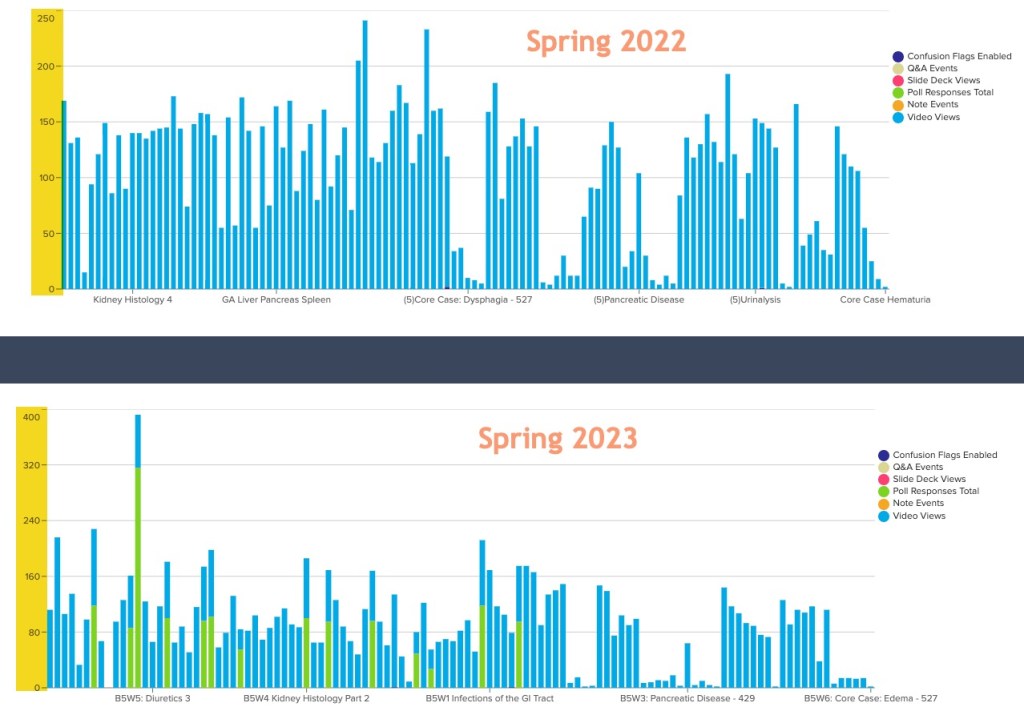
I wanted to share a quick story of how embedding interactive polling in our videos has made a significant and positive increase in views at University of Illinois College of Medicine. These first-year medical students are just about to take their final exam for this course so we won’t know quite yet if the embedding of interactive polling in previously passive video content will help improve scores this spring. 

In the spring 2022 image, you can see video views top out around 250 for some videos (and quite low for others). In the spring 2023 image, notice the video views top out around 400! The blue indicates video views and the green indicates interaction with embedded polling, which was nonexistent in 2022. Note, we did not insert polling in every pre-recorded video. For this academic year, we were able to do this for about 15 pre-recorded videos. I’m happy with the progress and look forward to more successes in future block courses!

Bar charts showing the difference in video views and interactivity from spring 2022 to spring 2023

When we have embedded polling in these types of videos for other courses, the feedback from students is universally positive. Some examples of feedback from students on evaluations: 

“I like how the video pauses and gives you the chance to click on an answer. All independent learning videos should incorporate that feature.”

“The summary tables after each video are helpful! I like the interactive questions! I would like that to be incorporated into more independent learnings.”

“I’m loving how interactive this lecture is. This is really cool.”

Feedback from instructors: 
“The process of adding interactive questions in videos was intuitive and quick.”

Absurdities with Artificial Intelligence

I attended a Quick Talk on AI from EDUCAUSE today. One of the presenters was talking about Midjourney and showing how you can create AI-generated images. They showed how Midjourney interprets what a nurse looks like, etc. I tried to use it myself and the server must be busy because I was not able to get into it myself. So, I tried a different tool, Stable Diffusion.

I asked it to present an image of an instructional designer talking with a team and here are some of the results. Navigate left and right to see the images. I’m not sure what happened to the people – one person seems to be a Vulcan and there is an alien to the right of the Vulcan.

AI is pretty cool in some respects but this is an example of how we have a lot to learn about it, and it has a lot to learn about itself.

More About Artificial Intelligence – How Are You Incorporating It In Your Courses?

ChatGPT has been in the news since at least November 2022. Many of you are likely familiar with it by now or have at least heard of it. In terms of artificial intelligence (AI), it is not the only player on the block. There has been a lot of hand-wringing from educators around the potential (and currently seen) impact of ChatGPT. In January 2023, New York state banned it in K-12. There have been a plethora of experts writing about it and hosting panel discussions.

The Rise of ChatGPT: How to work with and around it

From the description: “Watch an exciting episode of our Liquid Margins series, “Liquid Margins 38: The rise of ChatGPT and how to work with and around it”. In this episode, we discuss the implications of ChatGPT in higher education and how faculty are approaching this evolving new technology. Faculty guests include Joel Gladd of College of Western Idaho, Kat King of Diablo Valley College, Dr. Nicholas LoLordo of the University of Oklahoma, Rachel Elliott Rigolino of SUNY, together with our very own Jeremy Dean, VP of Education of Hypothesis.”

More Reading and Listening about ChatGPT

Faculty across the world have expressed concern about how AI might disrupt educational processes with worry that even their jobs might be at risk due to AI. I do not believe AI will be the deathknell for humans to continue to be educators. It will require us to think outside the lines for how to take advantage of it. 

AI can assist, but there would always be a need for instructional professionals because AI won’t know the students or the faculty on campus. AI won’t know what works best for the local learning community. AI won’t know the craft of  instruction or how a particular instructor helps students succeed through instructional practices and personal engagement/feedback. Context is very important and necessary. AI can learn about the context, but never experience the context or the engagement between learners, content, and instructor.

Michael Porterfield, Ph.D., Educational Technology Manager, McKendree University
EDUCAUSE, April 6, 2023 – Instructional Design Community

Continue on, Dear Reader

Read on to discover more AI tools out there and what they can provide. Who knows – maybe you’ll find one of them useful for your own purposes. These are some AI tools that I have found interesting lately.

Keep in mind (we already know this but still….) There’s much more to AI than ChatGPT. Here are ‘100 creative ideas’ for incorporating AI in education. How would you use these AI tools for teaching and learning?

Evidence Hunt

Evidence Hunt is an interesting resource which enables you to pose questions about clinical evidence to PubMed abstracts.

I posed the following question to it: In patients with osteoarthritis of the hip, is water therapy more effective than land-based exercise in restoring range-of-motion?

The response I got back from the AI tool: A comparison of land-based and water-based rehabilitation programs following total knee replacement surgery showed comparable outcomes in terms of range of motion in both groups (pmid: 19177536). However, there is no direct evidence comparing water therapy to land-based exercise specifically for hip osteoarthritis.

The query string it used to search PubMed:

((\”osteoarthritis\” OR \”hip osteoarthritis\”) AND (\”water therapy\” OR \”aquatic therapy\”) AND (\”range of motion\” OR \”ROM\” OR \”flexibility\”)) OR ((\”osteoarthritis\” OR \”hip osteoarthritis\”) AND (\”land-based exercise\” OR \”physical therapy\”) AND (\”range of motion\” OR \”ROM\” OR \”flexibility\”)) OR ((\”water therapy\” OR \”aquatic therapy\”) AND (\”hip range of motion\” OR \”hip mobility\” OR \”hip flexibility\”) AND (\”osteoarthritis\” OR \”hip osteoarthritis\”)) OR ((\”land-based exercise\” OR \”physical therapy\”) AND (\”hip range of motion\” OR \”hip mobility\” OR \”hip flexibility\”) AND (\”osteoarthritis\” OR \”hip osteoarthritis\”)) OR ((\”physical therapy\” OR \”exercise therapy\”) AND (\”water therapy\” OR \”land-based exercise\”) AND (\”hip range of motion\” OR \”hip mobility\” OR \”hip flexibility\”) AND (\”osteoarthritis\” OR \”hip osteoarthritis\”))

This is the main scholarly article in PubMed it pointed to:

Land-based versus water-based rehabilitation following total knee replacement: a randomized, single-blind trial

As I am not a subject expert in this area, I cannot verify the result is relevant. The About section of the website says it is scanning the text of over 35 million PubMed articles. Try it yourself. As of April 2023, you must include your email address when you search. 

Galileo AI

Galileo AI creates delightful, editable user interface (UI) designs from a simple text description. It empowers you to design faster than ever. It is currently in beta and you have to request early access. It sounds promising and not just for web designers. It will be interesting to see it in action when it’s available.

SlidesAI

SlidesAI is an AI tool to create ‘presentation slides in minutes.’ As of April 2023, it works with Google Slides and ‘coming soon’ to PowerPoint. You have to install the add-on to Google Slides for it to work.

I tried this out by using a description of an upcoming conference presentation.

Here is the description I gave it to produce slides:

“Health sciences scholarship acknowledges the need for widespread cultural transformation championing inclusion, diversity, equity, and accessibility (IDEA) across all levels of medical education and health care (Humphrey, Levinson, Nivet, and Schoenbaum, 2020).  As members of educational technology teams, we are uniquely positioned to engage with a broad range of the medical education community, including internal organizations, curricular development, audio visual and pedagogical technology support, and facilities.  In this session, four schools share their approaches to applying IDEA principles within their organizational culture and through implementations of educational technology in support of medical schools and inclusive patient care, including topics of belonging for women in technology, DEI curriculum, library databases, faculty development, and accessible learning spaces and technologies.”

Here is what SlidesAI produced: https://docs.google.com/presentation/d/10YSra2Yhtp1c0mwCoDXupk6zZeJyB2tVBp0khHIfueU/edit?usp=sharing

Synthesia.io

Synthesis.io is a platform to create ‘professional videos in minutes.’ Similar to Wellsaid Labs, this one brings video creation using AI to the next level. You add your own text, select a ‘talking head’ and see what it produces. Here are some of the features. Synthesia uses your text to create very lifelike avatars who speak your words.

Learn more about it with this short video introduction.

The days of computer-generated voiceovers that sound like a computer speaking are coming to a quick close.

Not going to be too critical, but I did notice a typo on their website. Should I tell them? Hmmm. Maybe I’ll have my avatar tell them using an AI-generated voice.

Wellsaid Labs

Wellsaid Labs is an AI voice platform. It helps you to create voiceovers using text-to-speech AI generated voices with different delivery styles, pitch, speed, etc.

Here are some examples for creating AI voiceovers for video production. This might be a useful tool if you need to record video but don’t want to spend the time recording your voice. As long as you have a decent script, this tool might work for you.

So there you go – some of the AI tools I’ve been looking at lately. There are so many coming out of the proverbial woodwork, it’s more difficult to keep up with them all.

Instructional Designers in Medical Education

I’m happy to show the world the first look at an article I wrote with colleagues at the University of Nebraska Medical Center.

Looking Beyond the Physician Educator: The Evolving Roles of Instructional Designers in Medical Education

This is the culmination of a study based on a cross-sectional survey sent to various online environments such as the DR-ED listserv. The goal was to reach people in medical education who also have a hand in instructional design. One major limitation is that we did not leave the survey open long enough to gain an even larger sample. Read the article and let me know what you think in the comments!

Playing around with H5P

I’ve been starting to play around with the cool tool of the year, H5P. If you are unfamiliar with it, think of it this way: you can create interactive educational content in a browser, that can also be viewed in a browser – no installation of additional programs required.

At the University of Illinois College of Medicine, our faculty members have created hundreds of hours of video podcasts, yet we haven’t had a good way of embedding true interactive elements in these videos. It is possible to add quizzes, etc. in video / screencast content that is created using products like Captivate or Camtasia, but in order for students to interact with it, Flash is required. Most of our students use Apple devices and as we know, Flash does not work on iPhones or iPads. So, I was pretty jazzed about this product. I heard about it on an AAMC GIR Educational Technology Workgroup monthly call recently and has been used by some of my colleagues including Anand Khurma (OSU) and Randy Graff (UF). More to come as I flesh out this tutorial on evidence-based medicine.

Here is a ‘work in progress’:

[h5p id="1"]

Getting Past the Uncomfortable

Today I gave a presentation for the faculty & fellows in the Division of Pulmonary, Critical Care, Sleep and Allergy in the Department of Medicine. I met with Dr. Christie Brillante a month or so ago because she had heard about some of the presentations I have given here in the college of medicine. I was slightly apprehensive to do this one, because she wanted me to talk about facilitation skills for people who do ‘micro-consults’ which could also be considered bedside consultations, ‘mini-consults’ which are slightly longer, and their regularly scheduled noon conferences.

EEK.

I was nervous because I have never been on rounds before so I did not really feel like I am an appropriate person to speak to it, and I made sure Dr. Brillante knew this. So, I went in, and delivered my presentation. It was a bit difficult as usual getting some of the attendees to speak up, but I persevered. What I can talk about is multimedia design. I shared some of our best practices in the college in regards to PowerPoint slide deck design like choice of color, font, amount of content, and taking into consideration some cognitive issues. In particular, I talked about some of Richard Mayer’s 12 Principles of Multimedia Learning. By the way, this document came from the University of Hartford, Faculty Center for Learning development. I focused on these three:

  • Coherence Principle – People learn better when extraneous words, pictures and sounds are excluded rather than included.
  • Signaling Principle – People learn better when cues that highlight the organization of the essential material are added.
  • Spatial contiguity Principle – People learn better when corresponding words and pictures are presented near rather than far from each other on the page or screen.

There is a ‘Last Page’ in Academic Medicine journal coming out soon and it was right on target with this topic. It’s called “‘We’re Not Too Busy’: Teaching with Time Constraints on Rounds” by Flint Y. Wang, MD, and Jennifer R. Kogan, MD at Perleman School of Medicine at the University of Pennsylvania. I have seen an advance copy of this one and it’s definitely worth looking at when the journal issue comes out.

Here is my presentation via SlideShare. Let me know what you think. I feel like the presentation went well. One of the attendees offered to bring me on consults and I jumped at the chance. It will give me some insight into an area of content facilitation that I am lacking expertise.

Instructional Designers are Architects of Learning

This was a comment to an article I read this morning called The Quest for Great Instructional Designers. Another commenter on this article made some strong points that I identify with:

The biggest problem, from personal experience as an instructional designer myself, is many institutions don’t have a clear definition, or simply don’t understand, of what instructional design (ID) is and what an instructional designer does. At the end of the day, instructional design is about taking everything we know about teaching/learning (systematically) and creating environments conducive to learning. ID postings that are seeking individuals to do high-end multimedia production, creating instructional media for faculty, and/or creating online courses for faculty is not instructional design. In cases like this, institutions are really asking for multimedia developers and course developers. Familiarity with contemporary learning management systems, in my mind, will always be an expectation for an instructional design position at least in higher education. With regards to knowing specific software applications, most ID graduate programs don’t offer much in terms of software skills. More focus tends to be on instructional design theory/practices, research, and andragogy. The software is one of those things that most instructional designers are left to learn on their own. By the way my MA and Ph.D. are in Instructional Technology/Design. Thanks for sharing your perspective.

The bold above is mine. Most job postings I see regarding instructional designer or technologist openings want someone who can do it all. So, great, you find a person who matches ALL of your requirements. They can do faculty development, understand how to use learning management systems, can program in multiple languages, have excellent video / audio / multimedia skills. First, is that what your organization needs, and second, you hire this one person who can do ‘it all,’ and a year later they leave. Back to square one. There is no I in TEAM!! You need a team of people to be ‘architects of learning.’

Keep an eye out for a research article hopefully later this year, which addresses this very issue. Dr. Linda Love, Dr. Faye Haggar and I did a survey on instructional designers in medical education and the results we got back address what is in this article and the comments. We are in the middle of writing up the results and hope to have it published within the next 6 months.

What is your perspective on what makes a great instructional designer?

Gamification in Medical Education

At the University of Illinois College of Medicine (UICOM), we have been exploring ways to liven up our educational sessions. With the advent of a new curriculum that has significantly fewer didactic sessions, and increased preparatory work by students leaves some holes to fill for face-to-face activities. One such example of gamification that we have employed recently is Kahoot!

Here is an example of Dr. Mahesh Patel using Kahoot! to encourage more interaction, and it proved to be a success.

We only use it sparingly, which I believe is why it is successful. Dr. Patel and I have worked together to figure out the best way to introduce it and when – the most success we have had with it is at the end of a busy week during a core case session. The students (and us!) are wiped out and it helps end the week on a fun note. We already use Poll Everywhere (probably too much), so this is a nice break from the ordinary.

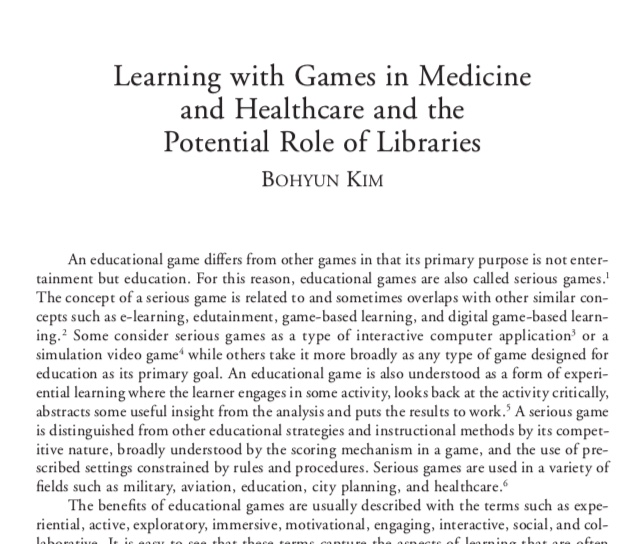
Frontpiece image of an article by Bohyun Kim for an article she wrote called Learning with Games in Medicine and Healthcare and the Potential Role of Libraries
Kim, B. (2015). Understanding gamification. Library Technology Reports, 51(2).


There is a growing number of scholarly articles in the medical education literature about gamification, and I predict that will just increase. A wonderful colleague of mine, Bohyun Kim, has published extensively on this topic, from the perspective of the librarian educator.


Here are some peer-reviewed citations to check out:

Hicks, G. L. (2015). Gamification: Fuelish or foolish? Journal of Thoracic and Cardiovascular Surgery, 150(5), 1059-1060.

Kim, B. (2015). Understanding gamification. Library Technology Reports, 51(2).*

McCoy, L., Lewis, J. H., & Dalton, D. (2016). Gamification and multimedia for medical education: A landscape review. Journal of the American Osteopathic Association, 116(1), 22-34. doi: 10.7556/jaoa.2016.003

McDougall, A. (2018). When I say ….. gamification. Medical Education, 52, 469-470.

*she wrote pieces for the entire report


Academic Conferences – Fun or Folly?

I went to the Information Technology in Academic Medicine conference last week in Austin, TX. I met many people who are a part of the Instructional Design Community – so nice to put faces to names. To be honest, I think I expected the conference to be very IT focused and outside of my interest level. I was pleased to be surprised – it was a fantastic conference. The ID Community was referred to by many people numerous times during the conference – so I am proud of what has been accomplished so far.

If you did not go to the conference last week, this will give you an idea of what was presented.

I want to put in a plug for the fall AAMC meeting in Austin, TX. Registration just opened. The conference is November 2-6, 2018: https://www.aamc.org/meetings/annual/. Registration is here.

Some of the sessions that I think pertain to the ID community:

Saturday, November 3

  • Evidence-Guided Self-Learning: How to Determine What You Need to Learn/Know/Do
  • Unhealthy Politics: The Battle Over EBM (I do a bit of work in this area, but not sure how prevalent it is with IDs)
  • Towards Competency-Based Time-Variable Education in Medical Education
  • When Robots Take Over Teaching? How VR and AI May Transform Medical Education

Sunday, November 4

  • Navigating the Medical Education Continuum: Strategies to Increase American Indian Engagement
  • Highlights in Medical Education: Faculty Development, Promotion and Tenure
  • Development of Expertise: The Role of Learning Science in Medical Education
  • The Use of Longitudinal Education Data for Learner Assessments and Program Evaluations
  • GIR Education Technology Knowledge-Sharing Session

Monday, November 5

  • Capturing Educational Data to Advance Medical Education
  • Highlights in Medical Education: Innovations in Teaching Clinical Reasoning
  • The Next Generation of Medical School Curriculum: Exploring Curricular Innovation and Change
  • An Inside Tour of Visionary Education Spaces

Tuesday, November 6

  • Highlights in Medical Education: Faculty Development Strategies
  • Highlights in Medical Education: Innovations in Medical Student Curriculum
  • Practical Strategies to Achieve Cognitive Integration of Clinical Skills and Basic Science Science